

Postback URL parameters
Reference for Skro postback parameters: click IDs, revenue, transaction IDs, conversion status, currencies, custom events, and platform-specific data.
A server-to-server (S2S) postback reports a conversion to Skro. The request must include the Skro click ID associated with the original visit. Additional parameters describe the event, revenue, and transaction.
Basic postback URL
https://skrotrack.com/postback?clickId=REQUIRED&payout=OPTIONAL&status=OPTIONAL&transactionId=OPTIONALUse the postback URL generated by your affiliate network template in Skro. Replace example values with the provider’s supported macros. If you use a custom tracking domain, use that domain in place of skrotrack.com.
Click IDs must match
Pass Skro’s {clickId} macro to the offer, then use the provider’s corresponding macro to return that same value in the postback. A provider’s own click identifier is not interchangeable with the Skro click ID.
Parameter reference
| Parameter | Purpose |
|---|---|
clickId | Required. Identifies the original Skro click. |
payout | Revenue amount for the conversion. |
status | Conversion status supplied by the affiliate network. |
transactionId | Identifier for an individual transaction or conversion step. |
payoutCurrencyCode | Currency code for the reported revenue. |
protectionToken | Secret token when postback protection is enabled. |
ce | Value that identifies a configured custom conversion event. |
p1–p5 | Additional values to record with the conversion. |
clickId
Skro generates a click ID for a campaign visit. Pass it to the offer using the parameter supported by your network. For example, if the network accepts the value in s2:
https://example.com/offer?s2={clickId}When a conversion occurs, the network sends the stored value back as clickId. Skro uses it to attribute the conversion to the original campaign and visit attributes, including location, device, and operating system.
Check your network’s guide or ask your account manager which macro returns the stored value.
payout
Use payout to report revenue per conversion. With Auto payout tracking, populate it with the network’s revenue macro or a fixed value. Manual payout tracking uses the payout configured in Skro.
status
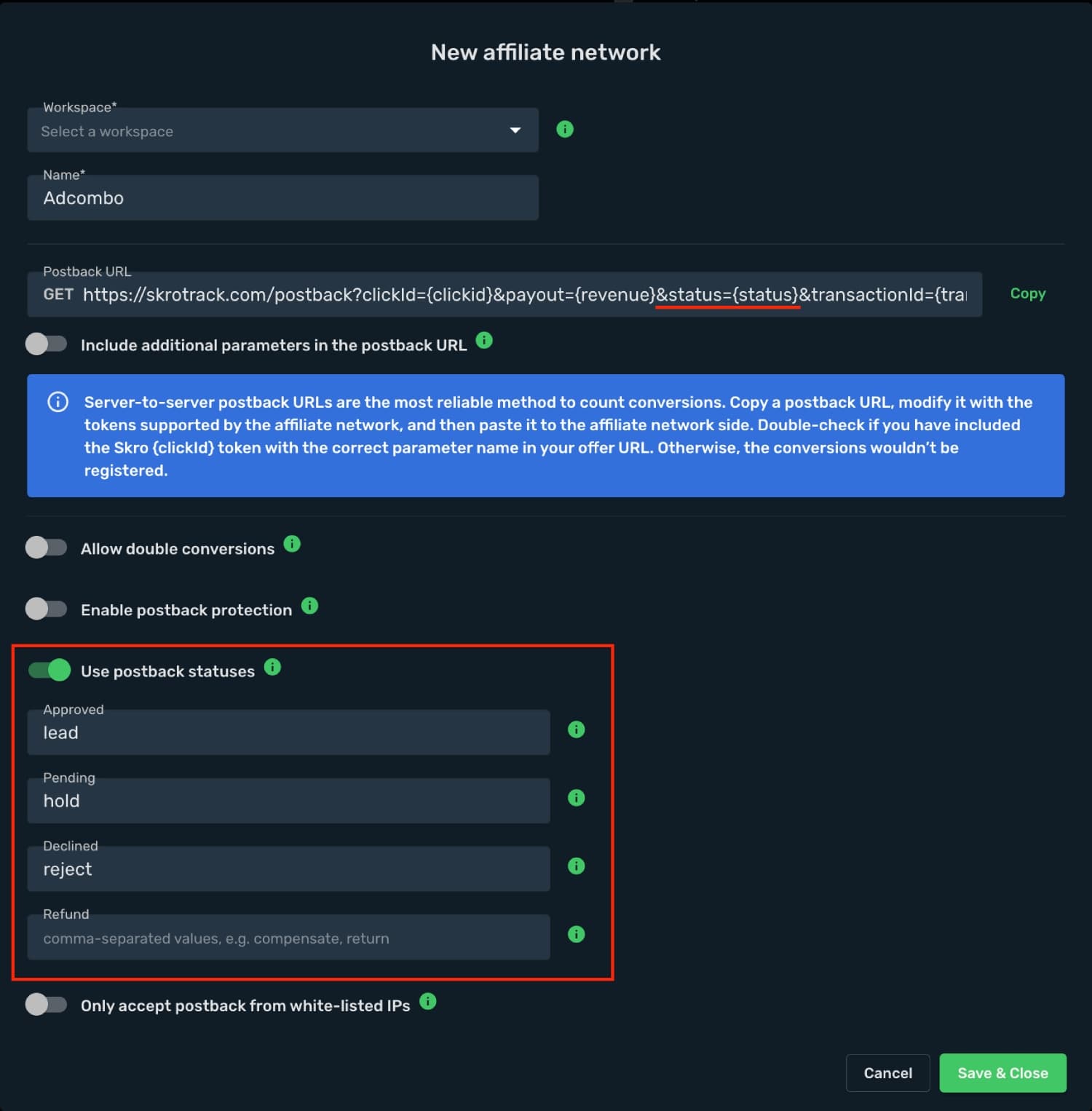
Use status to report the conversion’s stage, such as a lead awaiting approval or an approved conversion. Your affiliate network must provide a status value or macro.
Configure the status mappings in your Skro affiliate network settings. Templates such as AdCombo include predefined mappings and a postback macro.
transactionId
Use transactionId to identify individual transactions associated with a click. This is useful when a visitor completes multiple conversion steps, purchases, or upsells.
Pass the network’s transaction macro or a transaction identifier from your own system. Choose a value that identifies the conversion being reported.
payoutCurrencyCode
Pass the currency of the revenue amount, for example USD, EUR, or GBP. A currency supplied in the postback takes priority over the configured default currency.
protectionToken
Enable postback protection in the affiliate network settings, then include the configured token in the postback URL.
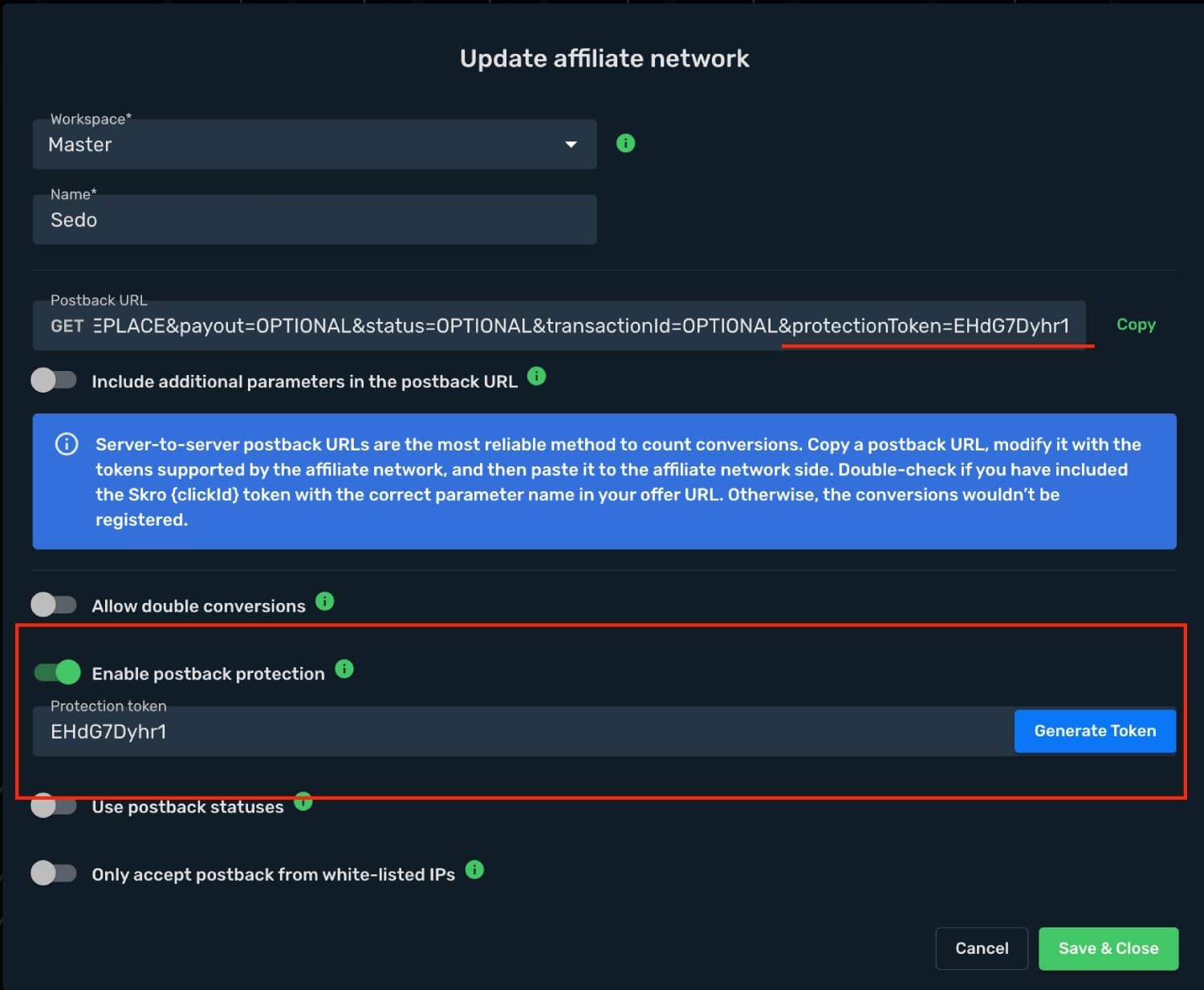
https://skrotrack.com/postback?clickId=REPLACE&payout=5&protectionToken=YOUR_PROTECTION_TOKENUse your own token from Skro; the value above is a placeholder.
ce: custom conversion events
Use ce to distinguish events such as installs, registrations, purchases, deposits, and upsells. Configure the accepted values in Custom Conversions before sending them. Your subscription determines the available number of events, up to 20.
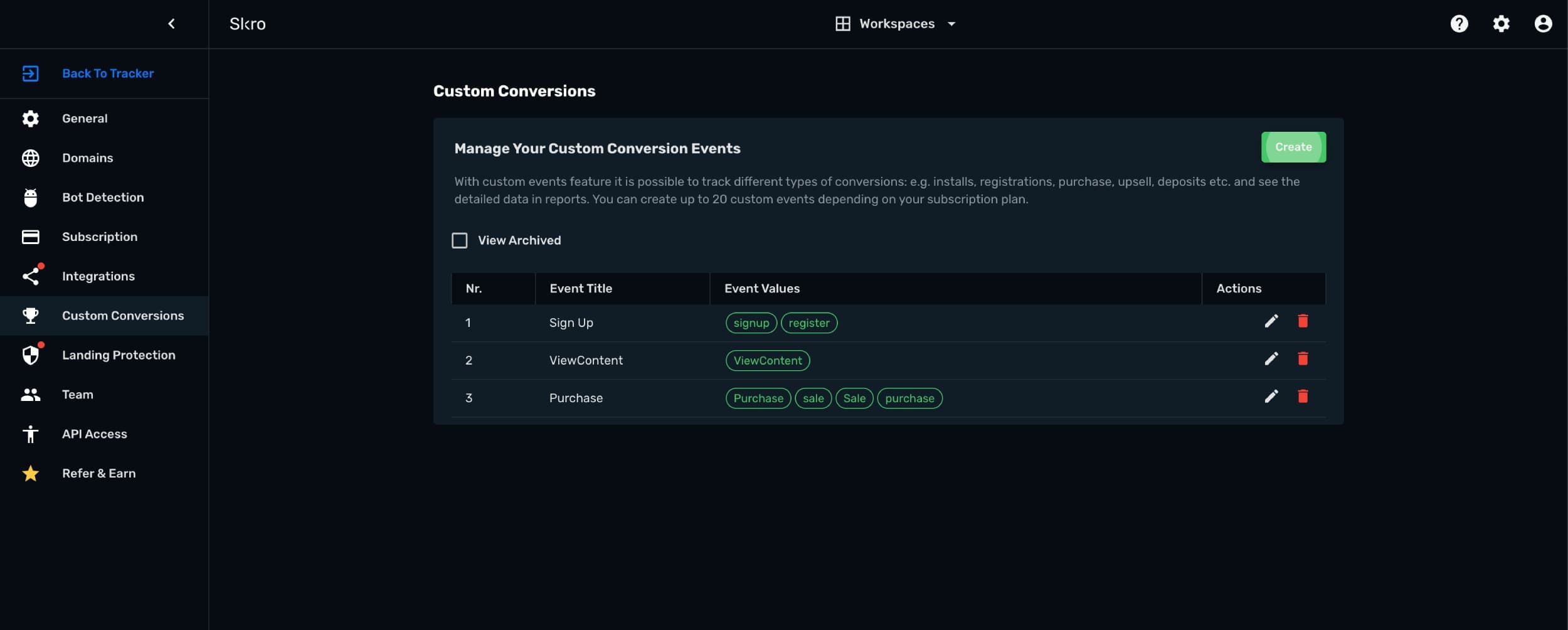
For example, an App Install event can accept both inst and install. A postback containing either value is categorized under the configured event:
https://skrotrack.com/postback?clickId=REPLACE&payout=5&ce=installSee Custom conversions for reporting options and traffic source event mappings.
p1–p5: additional data
Use p1 through p5 to store additional information supplied by the network. Assign each parameter a supported macro or value.
https://skrotrack.com/postback?clickId=REPLACE&payout=OPTIONAL&status=OPTIONAL&transactionId=OPTIONAL&p1=OPTIONAL&p2=OPTIONAL&p3=OPTIONAL&p4=OPTIONAL&p5=OPTIONALMeta Conversions API parameters
Connect your Meta ad account and Conversions API integration before using these fields.
| Parameter | Value |
|---|---|
firstName | Customer’s first name; Roman alphabet characters are recommended. |
lastName | Customer’s last name; Roman alphabet characters are recommended. |
email | Customer’s email address. |
phone | Customer’s phone number. |
zip | Postal code in lowercase, without spaces or dashes. Use five digits for US ZIP codes. |
fbLoginId | Meta app-scoped login ID. |
fbp | Browser ID from the _fbp cookie on your domain. |
sourceDomain | Overrides the source domain sent to the traffic source; the landing or offer domain is used by default. |
eventId | Identifier used to match the browser and server copies of the same event for deduplication. |
https://skrotrack.com/postback?clickId=REPLACE&payout=10&firstName=John&lastName=Doe&[email protected]&zip=12345&fbLoginId=APP_SCOPED_ID&fbp=fb.1.1596403881668.1116446470&sourceDomain=example.com&eventId=EVENT_IDFor details, see additional Meta conversion parameters.
TikTok conversion parameters
Connect your TikTok ad account and conversion integration before using these fields.
| Parameter | Purpose |
|---|---|
sourceDomain | Overrides the source domain sent to TikTok; the landing or offer domain is used by default. |
eventId | Identifies the same event across browser and server tracking for deduplication. |
Google Ads conversion parameters
Connect your Google Ads account and conversion integration before using these fields.
| Parameter | Purpose |
|---|---|
transactionId | Used as the order identifier for the Google Ads conversion. |
userConsent | When true, Skro passes granted values for Ad User Data and Ad Personalization. Supply the value that reflects the user’s consent. |
https://skrotrack.com/postback?clickId=REPLACE&payout=10&transactionId=order12345&userConsent=trueVerify a postback
- Open a campaign link and obtain a real Skro click ID from the resulting visit.
- Confirm that the offer receives that value in the network’s configured parameter.
- Trigger a test conversion using the network’s test workflow.
- Check the conversion, event name, revenue, currency, and status in the Skro campaign report.
If a conversion is missing, check the click ID mapping, protection token, and custom event value first. For network-specific macros, follow the matching guide in the integration directory.
Need help with this guide? Contact Skro support.